
Before you redesign: run these 10 checks on one ranking page
A useful Hong Kong mobile SEO review covers ten practical checks: the same essential content on phone and desktop; a clear page title and main heading; indexable language URLs; usable navigation; readable type and tap targets; stable images and banners; a responsive product table; a working form; acceptable Core Web Vitals; and an internal link to the next relevant page.
Do not treat the list as ten isolated scores. Follow one real visitor path from a Google result to a useful next step. A page can load quickly and still fail if the service is unclear, the Traditional Chinese version is incomplete or the enquiry confirmation never reaches the sales team.
| Check | Repeatable test | Acceptance evidence |
|---|---|---|
| 1. Essential content | Compare one service or product on desktop and phone. | Scope, exclusions, specifications and useful links remain available. |
| 2. Page identity | Read the title, main heading and opening answer. | They explain the same service or product in the current language. |
| 3. Search access | Inspect the live URL and rendered content in Search Console. | Record access, indexing and canonical findings separately from visual QA. |
| 4. Language journey | Switch English ↔ Traditional Chinese on the landing page. | Reach the corresponding topic with consistent facts and a usable return path. |
| 5. Navigation | Open and close the menu, then reach the next useful page. | Links work, focus is visible and fixed controls do not cover the task. |
| 6. Reading and controls | Use long labels and enlarged text on a narrow phone screen. | Text remains readable and buttons can be operated without overlapping labels. |
| 7. Images and stability | Watch the hero, images and notices while the page loads. | Record any visible shifts; reserve space and verify the relevant image loads. |
| 8. Product evidence | Read a populated specification table and open its document. | Values match headings; the document matches the model and return route works. |
| 9. Enquiry states | Try missing data, correction and the actual delivery or draft path. | Inputs survive errors; the result accurately states draft, failure or receipt. |
| 10. Performance | Record mobile field data and a repeatable lab run for the URL. | Label the data source and limitations; re-test the observed cause after repair. |
Check content before changing the layout
Google uses the mobile version of content for indexing and ranking. Its guidance recommends keeping essential content equivalent across devices. A compact layout should therefore preserve useful service details, specifications and links rather than remove them solely to shorten the screen.
Make a two-column inventory of your desktop and phone views. Include delivery areas, minimum-order explanations, relevant qualifications, product documents and enquiry instructions. An accordion can organise long material; test that its contents are available and its controls work. Pay particular attention to custom mobile templates that may have drifted from the desktop version.
Distinguish hiding from loading. A closed accordion can contain the full answer in the rendered page; a control that fetches the primary answer only after a tap is a different implementation. Google says not to make primary content depend on interaction to load. Ask the developer to demonstrate what is already available before the visitor clicks.
Google: mobile content and rendering requirements Official technical guidance. The device comparison and acceptance tests in this article are our suggested workflow.
Review bilingual navigation and product details
Test the English and Traditional Chinese versions separately. “Product specifications” and “產品規格” occupy different widths; a navigation solution that works for one language may wrap awkwardly in the other. Let labels wrap deliberately and keep the language switch reachable after the menu opens.
For a specification table, preserve the relationship between each value and its heading. A scrollable table with a clear cue may serve buyers better than tiny text. Test an actual product with long names and several units, rather than an empty design sample. Check that a fixed WhatsApp button does not cover the last table row or a form error.
Check the implementation of language and next-step links as well as their appearance. Google recommends anchor links with an href destination; a script-only click target is not a reliable substitute. Use descriptive labels so a buyer knows which topic or document will open.
Follow the enquiry all the way through
A working button is only the beginning. Open the menu, choose a service, follow a document link and return to the page. Then try missing information and correct it with the on-screen keyboard visible. W3C recommends understandable error and completion messages; check that these messages stay visible and that entered details remain available.
Test the mode the site actually provides. For a receiving endpoint, send an agreed, labelled test and verify its receipt in the receiving system and inbox. For an email-draft flow, check the product details and the instruction to send from the mail app. Preparing a draft does not prove delivery. Mark the recipient check as unverified until someone checks it.
Offer a sensible alternative when the primary channel depends on another app. An overseas buyer may prefer email to WhatsApp. A caller needs the correct international dialling code. Keep the wording honest: a contact click records an attempt to connect, while a received, relevant enquiry is a different outcome.
Use the following example tasks to write a repair brief. These are suggested checks, not findings from a completed audit of a particular website. Content access and crawling affect search visibility; form completion is a separate enquiry measurement.
| Buyer task | How to check | Acceptance condition |
|---|---|---|
| Read a product specification | Compare the same model on desktop and phone. | Units, dimensions and certification details remain available and readable. |
| Switch from English to Traditional Chinese | Change language on a product or service page. | The switch reaches the matching page; the offer and product facts remain consistent. |
| Open a product document | Follow a specification or certificate link, then return to the page. | The right document opens and the buyer can return to the product and enquiry route. |
| Correct an incomplete enquiry | Leave a required field empty and submit with the phone keyboard open. | A readable message identifies the field and entered information is retained. |
| Send or prepare a quotation request | Use labelled test details with a product code; follow the real delivery mode. | A draft is labelled unsent. A receipt claim is supported by the receiving system and inbox check. |
W3C WAI: understandable form notifications Reference for error and completion feedback. Message wording alone cannot verify delivery.
First-hand studio check
A mobile enquiry flow, step by step
Follow a product from its specifications to an enquiry draft. These are actual screenshots of the English Hong Kong trade-page preview.
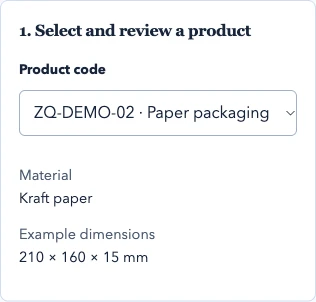
Choose a product
Start with the product code and key specifications.
 View full screenshot
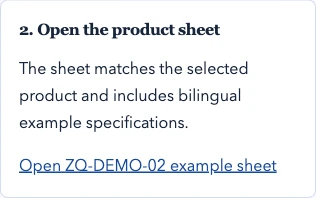
Check the product sheet
The sheet link keeps the selected product code.
 View full screenshot
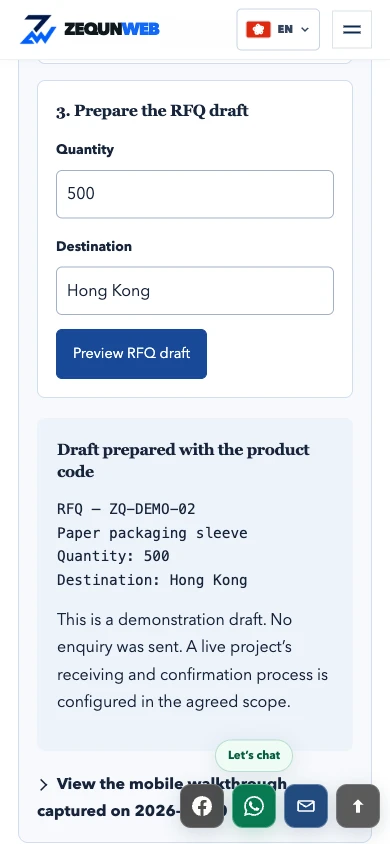
Prepare the enquiry draft
Review the quantity and destination. The draft is not sent.
 View full screenshot
- Single-column layoutNo page-wide horizontal overflow at 390 px.
- 46 px controlsEvery inspected field and action button met this height.
- Consistent product codeZQ-DEMO-02 stayed in the sheet link and RFQ draft.
- Draft onlyQuantity 500, destination Hong Kong. No enquiry was sent.
What this check covers
The screenshots, form and draft are in English, captured at a browser viewport of 390 × 844 px. This is a responsive browser check, not a physical-device test or a Core Web Vitals score. Receiving services, physical-device keyboards and other viewport sizes were not verified.
The earlier article offered suggested checks. This update adds a working example, its single-column layout and reproducible observations. There is no comparable pre-change mobile measurement, so we do not claim improved speed, CLS or conversion rate.
Measure Core Web Vitals on the page that ranks
Use Search Console to identify relevant Core Web Vitals groups, then inspect the landing page in PageSpeed Insights. The good thresholds are LCP ≤ 2.5 seconds, INP ≤ 200 milliseconds and CLS ≤ 0.1, evaluated at the 75th percentile separately for mobile and desktop. A missing field-data assessment is an evidence gap, not a pass or failure.
Keep the real-user section and the lab section in separate rows. Save whether the real-user result is for this URL or the broader origin, the collection period, and whether enough data is available. For a lab run, save the tested URL, date, tool, simulated device and network settings. A local preview or one desktop Lighthouse run cannot establish live mobile experience.
Investigate the cause shown by the diagnostic: for example a main image, delayed interaction or loading notice. Repeat the same lab setup after the repair and explain what changed. Check field data later when it covers the released version. A Lighthouse performance score is not an INP measurement or a search-ranking result.
Web Vitals: thresholds and measurement Official threshold reference; local or lab observations must be identified separately from real-user data.
Does mobile SEO also help AI search answers?
For Google AI Overviews and AI Mode, a supporting page must be indexed and eligible for a search snippet. Google states that no special AI file or schema is required. These are Google-specific conditions; they do not describe every answer engine or guarantee selection.
Apply that to the mobile page by making the actual service, limitations, product facts and supporting sources readable in text. Put a concise answer near the question, then give the details needed to verify it. Treat this as an editorial improvement for readers, rather than a promised formula for an AI citation.
In this checklist, GEO refers to visibility in generative answers and AEO to useful answers to customer questions. Measure a reproducible citation separately from a search visit and a received enquiry. Save the engine, question, language and date when you observe a citation; a single response is an observation, not a stable ranking.
Google: AI features and your website Official eligibility and technical guidance for Google Search AI features. Other engines have their own policies.
Turn observations into a small repair scope
Write one issue per line: URL, language, device or viewport, buyer task, current result, expected result and owner. “The English RFQ error is covered by a fixed button at 390 px” is easier to accept than “the mobile site is hard to use”.
Repeat the same task after the fix and keep a screenshot or recording. Record content and interaction fixes separately from performance measurements and receipt tests. Use the ten-point table above to decide what evidence is needed, then put unresolved tasks into the change brief.
Sources and scope
- Google: Mobile-first indexingdevelopers.google.com
Supports the mobile content and interaction-dependent loading guidance. The ten task tests are editorial recommendations.
- Google: Understanding Core Web Vitals and Search resultsdevelopers.google.com
Explains the relationship to Search; good metrics do not guarantee top rankings.
- Web Vitals: metrics and thresholdsweb.dev
Reference for the current good thresholds and the 75th-percentile assessment across mobile and desktop.
- Google: AI features and your websitedevelopers.google.com
Supports the Google AI Overviews and AI Mode eligibility statement; no citation or traffic outcome is promised.
- Google: Link best practicesdevelopers.google.com
Reference for usable href links. Language and next-step links should lead to the expected topic.
- W3C WAI: User notificationsw3.org
Supports clear form error and completion feedback; delivery must be checked separately.